Overview
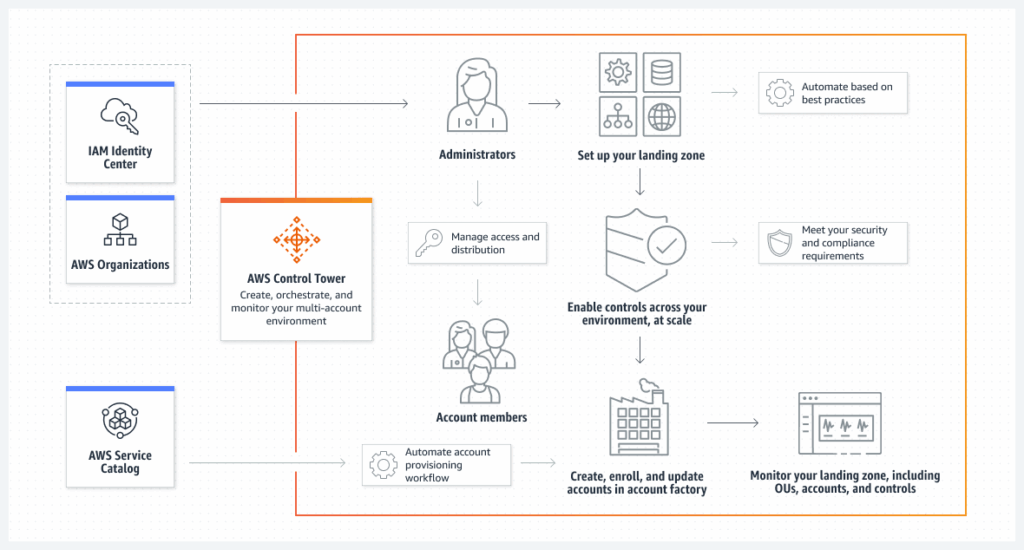
AWS Control Tower simplifies the setup and governance of secure, multi-account AWS environments. As part of its built-in security capabilities, Control Tower automatically provisions an Amazon SNS topic named aws-controltower-SecurityNotifications in every enrolled AWS account. This topic is responsible for delivering security-related alerts and notifications.
By default, these SNS topics are encrypted using AWS-managed encryption at rest. However, organizations operating under strict security and compliance requirements often require explicit control over cryptographic keys. In such cases, encrypting these notifications with customer-managed AWS KMS keys becomes essential.
This post walks through the challenges, solution architecture, deployment steps, and verification process for enabling customer-managed key (CMK) encryption on AWS Control Tower–managed SNS topics.
Why This Matters: Key Challenges
Implementing CMK-based encryption for Control Tower SNS topics introduces several technical and operational challenges:
- Control Tower dependency
AWS Control Tower must be fully operational on version 3.3 or later to support customer-managed KMS keys. - Compliance obligations
Regulated industries governed by standards such as GDPR, HIPAA, and PCI DSS require direct ownership and lifecycle control of encryption keys. - Operational complexity
Manually configuring encryption across multiple AWS accounts and Regions leads to inconsistency, human error, and increased administrative overhead. - Centralized governance
Ensuring uniform encryption standards, consistent key policies, and controlled access across organizational units is non-trivial without automation.
Solution Architecture
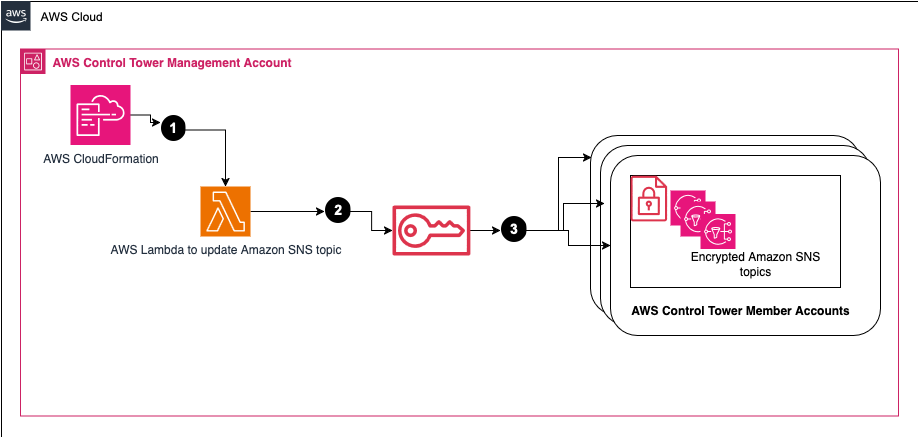
This solution provides an automated and centralized approach to encrypting AWS Control Tower–managed SNS topics using customer-managed KMS keys.
High-level approach
- A CloudFormation stack is deployed in the AWS Control Tower management account
- The stack provisions a custom AWS Lambda function
- The Lambda function:
- Assumes the AWSControlTowerExecution role
- Updates the
aws-controltower-SecurityNotificationsSNS topic - Applies a specified customer-managed KMS key across all relevant accounts and Regions
This ensures encryption consistency while eliminating the need for manual per-account configuration.
Prerequisites
1. AWS Control Tower
- AWS Control Tower must be fully set up and running version 3.3 or later
- Member accounts must be enrolled in the
AWSControlTowerBP-BASELINE-CONFIGStackSet
2. AWS Key Management Service (KMS)
- Customer-managed KMS keys must already exist:
- In all target Regions
- In all relevant member accounts
3. Required IAM Permissions
To deploy the CloudFormation stack, users must have permissions similar to the following:
{
  "Statement": [
    {
      "Effect": "Allow",
      "Action": [
        "cloudformation:CreateStack",
        "cloudformation:DescribeStacks",
        "cloudformation:DescribeStackEvents",
        "cloudformation:DescribeStackResources",
        "cloudformation:GetTemplateSummary",
        "cloudformation:ListStacks",
        "cloudformation:UpdateStack",
        "cloudformation:DeleteStack",
        "cloudformation:ValidateTemplate"
      ],
      "Resource": "*"
    }
  ]
}
4. KMS Key Policy Requirements
Each customer-managed KMS key must allow access to:
- The AWSControlTowerExecution role
- Amazon EventBridge
- Amazon SNS
Example key policy excerpt:
{
  "Statement": [
    {
      "Sid": "AllowControlTowerExecutionRole",
      "Effect": "Allow",
      "Principal": {
        "AWS": "arn:aws:iam::member-account-id:role/AWSControlTowerExecution"
      },
      "Action": [
        "kms:CreateGrant",
        "kms:DescribeKey",
        "kms:Encrypt",
        "kms:Decrypt",
        "kms:GenerateDataKey*"
      ],
      "Resource": "arn:aws:kms:region:member-account-id:key/key-id"
    }
  ]
}
Deployment Steps
- Sign in to the AWS Control Tower management account
- Switch to the Control Tower home Region
- Download the CloudFormation template from the solution repository
- Launch a new CloudFormation stack
- Provide the parameter:
- KMSKeyId: Comma-separated list of CMK ARNs
- Format:
arn:aws:kms:region:account-id:key/key-id - Keys must exist in all target Regions and accounts
- Format:
- KMSKeyId: Comma-separated list of CMK ARNs
- Acknowledge IAM resource creation and select Create stack
- Wait until the stack status becomes CREATE_COMPLETE
Note:
Due to CloudFormation parameter limits, a single stack supports approximately 38 KMS key ARNs. For larger environments, deploy additional stacks as needed.
Once deployed, the Lambda function executes automatically and updates the SNS topics.
Verification Steps
- Log in to a member AWS account
- Navigate to the Amazon SNS console
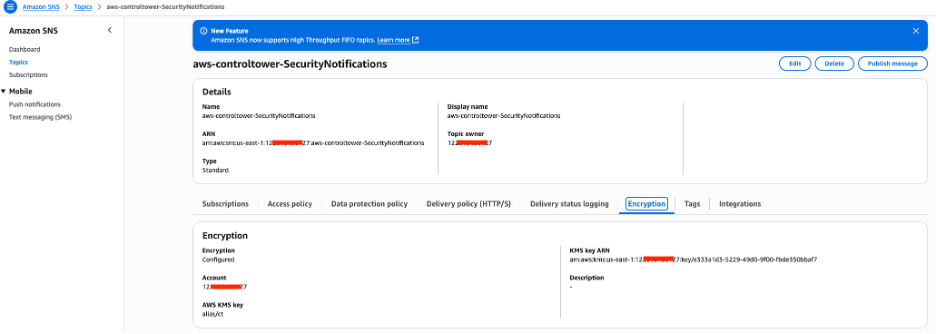
- Select the topic aws-controltower-SecurityNotifications
- Open the Encryption tab
- Confirm:
- Server-side encryption is enabled
- The KMS key ARN matches the provided customer-managed key
Repeat for additional accounts if required.
Cleanup
To remove the solution:
- Delete the CloudFormation stack from the management account
No additional manual cleanup is required. Until deletion, the solution remains scoped only to the KMS keys and accounts specified during deployment.
Conclusion
By encrypting AWS Control Tower security notifications with customer-managed KMS keys, organizations gain:
- Stronger security governance
- Compliance alignment with regulatory frameworks
- Centralized and automated encryption management
- Reduced operational overhead
This approach enables teams to retain full control over cryptographic keys while maintaining the scalability and governance benefits of AWS Control Tower.
For hands-on learning, consider exploring the official AWS Control Tower workshop.
Tags: AWS Control Tower, Cloud Governance, Security, AWS KMS, Amazon SNS



Leave a Reply