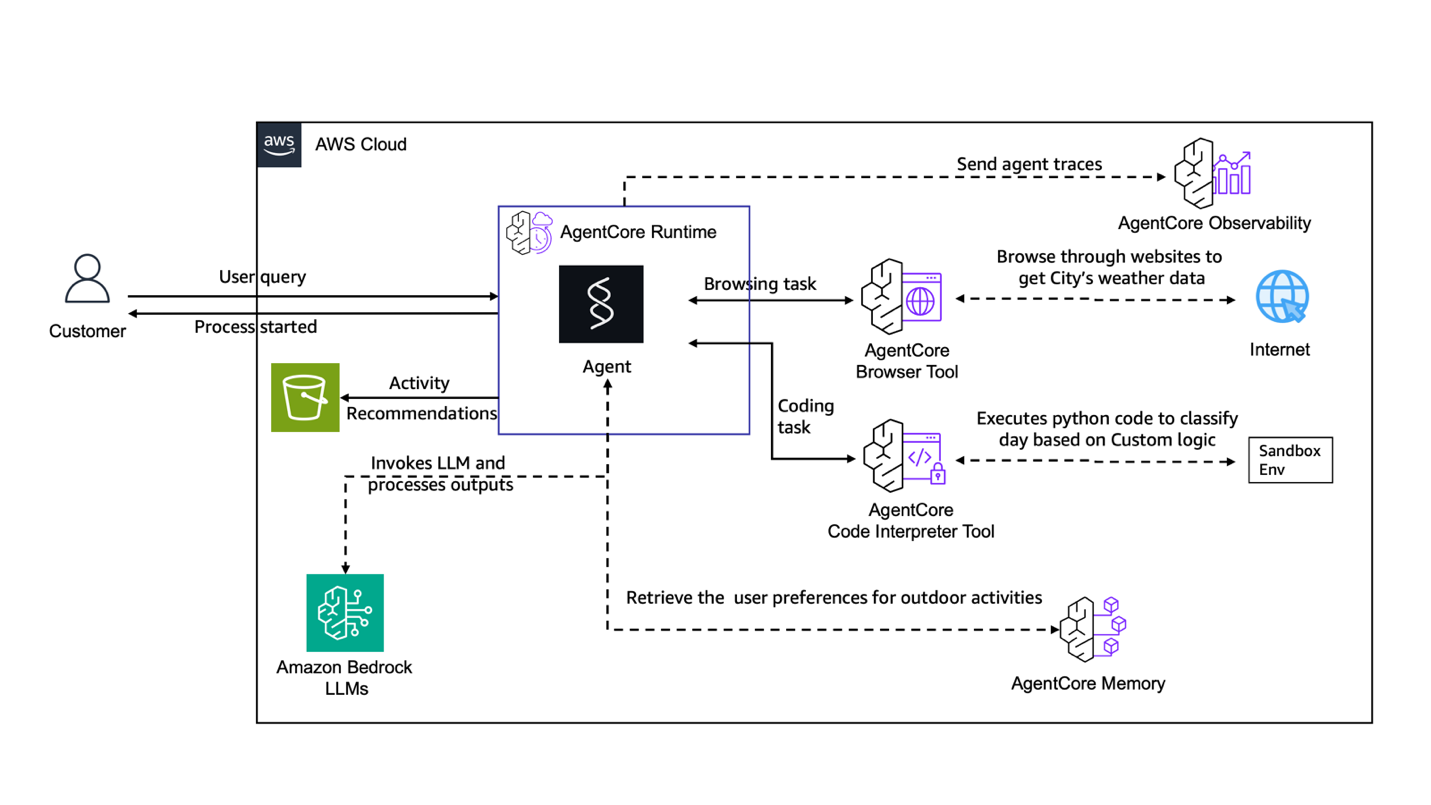
If you’ve been working with agentic AI systems long enough, you already know the pattern: the model logic comes together relatively quickly, but the surrounding infrastructure — runtimes, memory stores, browser access, code execution environments — is where things get complicated fast. Every new environment means re-doing that setup, and manual configuration at that scale is a reliability problem waiting to happen.
That’s exactly where Infrastructure as Code (IaC) changes the game for agentic workloads. And with Amazon Bedrock AgentCore now supporting CloudFormation, CDK, and Terraform, there’s no good reason to be provisioning agent infrastructure by hand.
In this post, I’ll walk through how to deploy a fully functional AI agent using CloudFormation — specifically a weather-based activity planner that ties together several AgentCore services into a coherent, production-style architecture.
Why IaC Matters More for Agentic Systems
For traditional applications, IaC is primarily about consistency and speed. For agentic systems, it’s also about behavioural reliability. Agents operating with minimal human oversight are highly sensitive to environment drift — a misconfigured memory store or a slightly different runtime version can produce unpredictably different agent behaviour across environments.
IaC enforces consistency declaratively. You get:
- Reproducible deployments across dev, staging, and production with the same template
- Version-controlled infrastructure with rollback capability — critical when an agent update causes regressions
- Automated security validation baked into your CI/CD pipeline before anything reaches production
- Parameterized scaling — the same base template can serve lightweight development and high-throughput production by adjusting parameters, not rewriting configuration
Amazon Bedrock AgentCore services are now first-class citizens in CloudFormation, which means you can declaratively define your entire agent stack alongside your existing AWS infrastructure.
The Application: A Weather Activity Planner
To make this concrete, I’ll use a weather activity planner agent — a practical example that pulls real-time meteorological data and generates personalized outdoor activity recommendations based on current conditions at a location of interest.
What the Agent Does
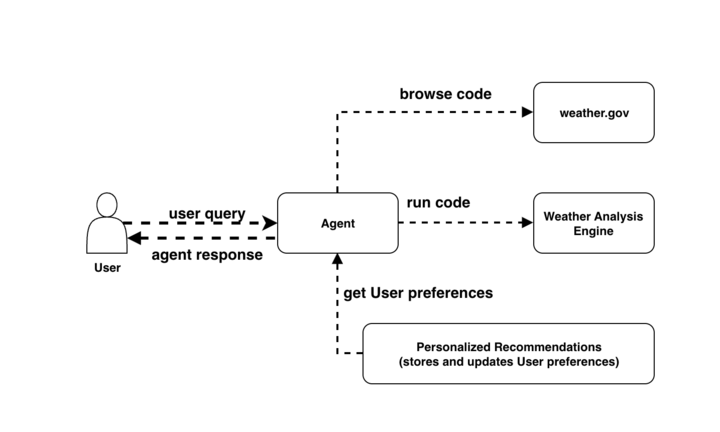
The agent handles the full pipeline from raw data to recommendation:
1. Real-time data collection The agent fetches current weather data from sources like weather.gov, pulling temperature, precipitation probability, wind speed, and other atmospheric conditions relevant to outdoor activity planning.
2. Weather scoring logic Raw weather data is processed through a custom scoring algorithm with the following rules:
- Temperatures below 50°F reduce the suitability score for outdoor activities
- Precipitation probability above 30% triggers downward adjustments to outdoor recommendations
- Wind speeds exceeding 15 mph affect comfort and safety ratings across activity types
3. Personalized recommendations Scoring output is combined with stored user preferences and location awareness to produce tailored activity suggestions — not just generic advice based on temperature ranges.
AgentCore Services Used
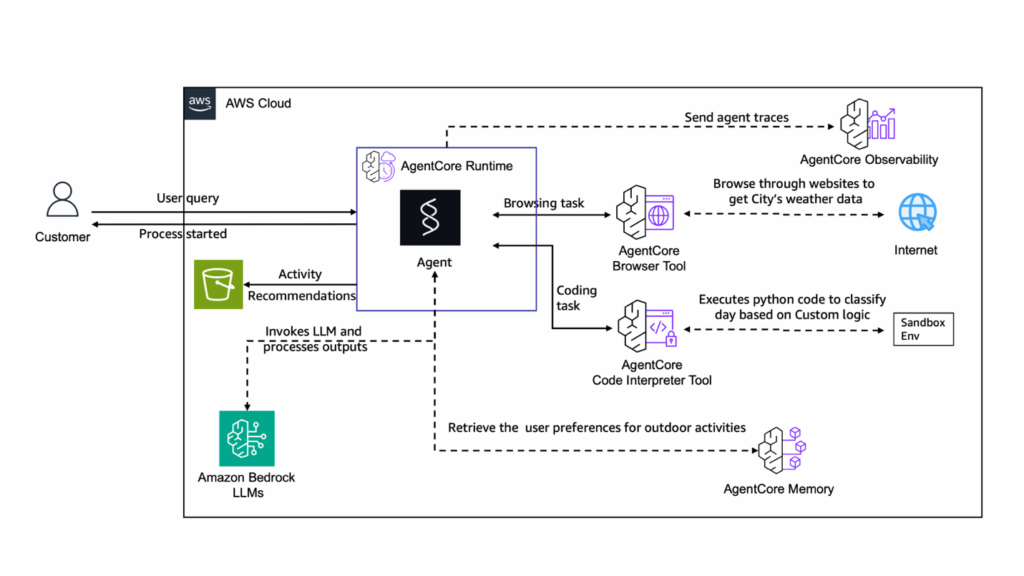
Each part of this pipeline maps to a specific AgentCore capability:
| Component | AgentCore Service | Role |
|---|---|---|
| Weather data retrieval | AgentCore Browser | Automated browsing of weather.gov and similar sources |
| Scoring algorithm execution | AgentCore Code Interpreter | Runs Python code for calculations and scoring logic |
| Pipeline orchestration | AgentCore Runtime | Hosts the agent, manages data flow between components |
| User preference persistence | AgentCore Memory | Stores long-term user preferences across sessions |
This composition is what makes AgentCore compelling for production workloads — you’re not stitching together independent services yourself, you’re working with purpose-built components designed to interoperate.
Deploying with CloudFormation
The full CloudFormation template (End-to-End-Weather-Agent.yaml) is available in the AWS GitHub Sample Library. Here’s the deployment flow:
Step-by-Step Deployment
# 1. Download the template
# End-to-End-Weather-Agent.yaml from the AWS samples GitHub repo

# 2. Deploy via AWS CLI (alternative to console)
aws cloudformation create-stack \
  --stack-name weather-agent-stack \
  --template-body file://End-to-End-Weather-Agent.yaml \
  --capabilities CAPABILITY_IAM \
  --parameters ParameterKey=Environment,ParameterValue=dev
Or via the console:
- Open CloudFormation → Create stack → With new resources (standard)
- Upload the template file
- Set your stack name and adjust parameters as needed
- Acknowledge IAM capability creation
- Submit and monitor progress on the Events tab
Key Template Design Principles
A few things worth paying attention to in the template structure:
Modular sections per service — each AgentCore component (Browser, Code Interpreter, Runtime, Memory) has its own template section. This makes it straightforward to swap or extend individual components without touching unrelated configuration.
Parameterized for reuse — the template externalizes configurable values: the base container image, build configuration, and the foundation model powering the agent. This means you can point the same template at Claude 3.5 Sonnet in one deployment and a different model in another without editing the template body.
Scoped IAM roles — each AgentCore component gets its own IAM role with permissions scoped to the specific resources it needs, using explicit ARNs rather than wildcard policies. This is non-negotiable for production agentic workloads where the agent is taking real actions.
Observability: Don’t Skip This
One of the things I’d emphasise strongly for agentic deployments is getting observability right from day one. Agents are harder to debug than deterministic services — when something goes wrong, you need detailed trace data to understand what the agent decided to do and why.
AgentCore Observability surfaces this through CloudWatch-powered dashboards and end-to-end distributed tracing. Key capabilities:
- Workflow visualizations showing the full agent execution path across tools and model calls
- Token usage metrics and tool selection patterns — useful for both cost management and debugging unexpected agent behaviour
- OpenTelemetry-compatible trace format — if you’re already using Datadog, Arize Phoenix, LangSmith, or LangFuse, AgentCore traces can flow into your existing observability stack without re-instrumentation
For AgentCore Runtime-hosted agents, instrumentation is automatic. For agents deployed elsewhere, it’s configurable. Either way, set it up before you go to production — retrofitting observability into a running agentic system is painful.
Adapting This Template for Your Use Case
The weather planner is a template in both the literal and conceptual sense. The same architecture pattern applies across a wide range of agentic applications. Some examples of how to adapt each component:
AgentCore Browser — swap weather.gov for financial data sources (investment research), social media feeds (sentiment monitoring), or ecommerce sites (price tracking and competitive intelligence).
AgentCore Code Interpreter — replace the weather scoring algorithm with your own business logic: predictive sales models, insurance risk calculations, manufacturing quality control scoring.
AgentCore Memory — adjust what gets persisted. Customer profiles, inventory levels, project state, conversation history — the memory component is domain-agnostic.
AgentCore Runtime — reconfigure the orchestration tasks for your workflow: supply chain optimization, customer service automation, compliance monitoring pipelines.
The modular template design means these substitutions are isolated changes, not rewrites.
Production Deployment Checklist
Before you ship an AgentCore deployment to production:
- [ ] Modular template structure — separate CloudFormation sections per AgentCore service for maintainability
- [ ] Parameterize everything environment-specific — model choice, container image, build config, resource sizing
- [ ] Least-privilege IAM — explicit resource ARNs on every role, no wildcard policies
- [ ] CloudWatch logging enabled on all components with appropriate retention periods
- [ ] X-Ray distributed tracing configured for cross-component visibility
- [ ] CloudWatch alarms set for error rates, latency thresholds, and token usage anomalies
- [ ] Template stored in version control with automated CloudFormation validation in CI/CD
- [ ] StackSets configured if deploying across multiple regions
- [ ] Clean-up runbook documented — know how to tear down the stack cleanly without leaving orphaned resources
Cleaning Up
To avoid ongoing charges after testing:
# Delete S3 bucket contents first (CloudFormation can't delete non-empty buckets)
aws s3 rm s3://your-template-bucket --recursive
aws s3 rb s3://your-template-bucket

# Then delete the stack
aws cloudformation delete-stack --stack-name weather-agent-stack

# Monitor deletion
aws cloudformation wait stack-delete-complete --stack-name weather-agent-stack
Final Thoughts
The combination of AgentCore’s purpose-built agent infrastructure and CloudFormation’s declarative provisioning removes a significant amount of undifferentiated work from agentic application development. You’re not wiring together a browser automation layer, a code execution sandbox, a memory store, and an orchestration runtime from scratch — you’re configuring them through a template and letting the platform handle the operational complexity.
For teams serious about moving agentic AI systems into production, IaC isn’t optional. The reliability, reproducibility, and security controls that CloudFormation provides are exactly what autonomous systems require to operate safely at scale.
The full template and additional IaC examples (CDK and Terraform) are available in the AWS sample repositories on GitHub.


Leave a Reply