The Problem: Observability vs. Data Privacy
Modern distributed applications depend on structured, high-verbosity logging to keep mean time to respond (MTTR) low. When something breaks in production, you want rich contextual data — user identifiers, transaction details, request metadata — all correlated across services and available immediately in your logging platform.
The problem is that this same richness is what makes logs a liability. Applications handling in-app purchases, user profiles, or financial transactions often capture sensitive attributes as part of their normal operation. Credit card numbers, email addresses, full names, and physical addresses can end up in log lines that flow directly into CloudWatch.
In regulated environments — PCI DSS, HIPAA, GDPR — this is not just a security concern, it is a compliance mandate. The typical response is to strip sensitive fields at the application level, but this creates a different problem: you lose the context you need to investigate failures, which directly inflates MTTR.
The goal is to have both: fully verbose logs for operational efficiency, and masked data for security and compliance.
Reference Architecture
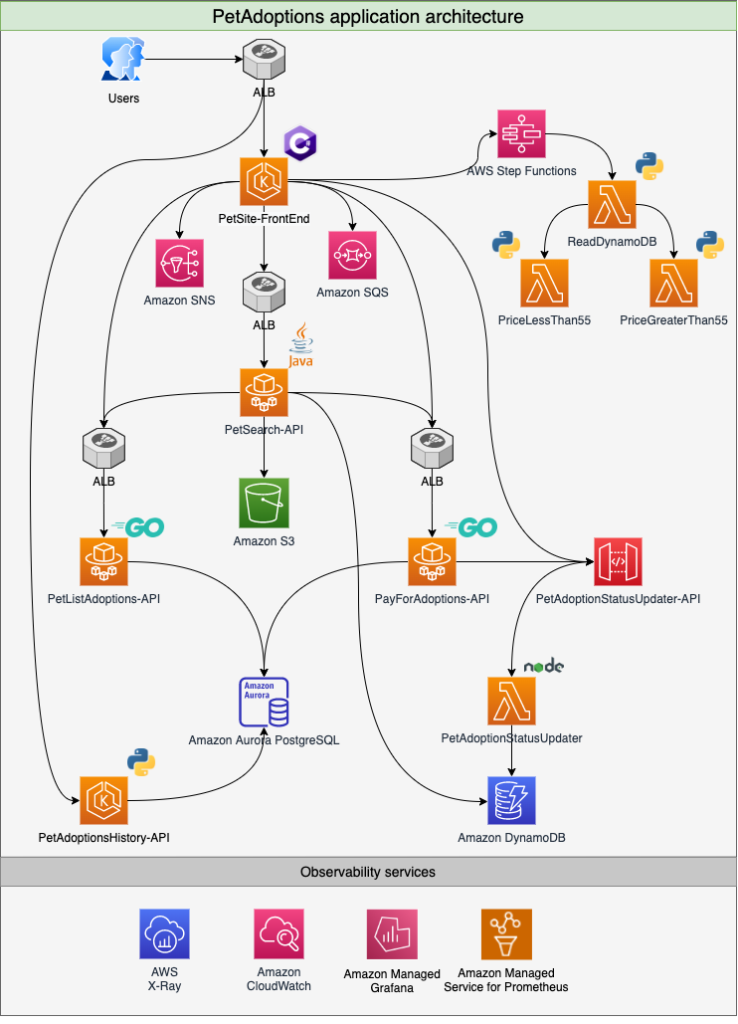
The examples in this post are based on the PetAdoptions application — a microservices-based demo app used in the AWS One Observability Workshop. It spans multiple AWS compute services including Amazon EKS, Amazon ECS, AWS Lambda, and API Gateway, and is written across Java, C#, Go, Python, and Node.js.
The application supports pet adoption with a payment flow, meaning it captures credit card details along with customer PII as part of completing a transaction. Telemetry from all services is streamed to Amazon CloudWatch and AWS X-Ray.
This architecture is representative of a typical multi-service production workload — polyglot, distributed, and highly instrumented.
What Is PII, and Why Does It End Up in Logs?
NIST defines personally identifiable information (PII) as any information that can be used to distinguish or trace an individual’s identity, or that is linked or linkable to an individual — including financial, medical, educational, and employment information.
In practice, PII ends up in logs because developers add contextual fields to accelerate debugging. A structured log event from the PetAdoptions payment service might look like this:
json
{
  "PetId": "002",
  "PetType": "puppy",
  "caller": "middlewares.go:60",
  "customer": {
    "ID": 1744785448587828200,
    "FullName": "Selim Zheng",
    "Address": "3333 Piedmont Road NE, Atlanta, GA 30305",
    "CreditCard": "4012000033330026",
    "Email": "selim@zheng.com"
  },
  "err": null,
  "method": "In CompleteAdoption",
  "took": "70.652636ms",
  "traceId": "71d5bd083fbbcbb9",
  "ts": "2025-04-16T06:37:28.587832004Z"
}
This is exactly the kind of log event you want when debugging a failed adoption. It is also exactly the kind of log event you never want sitting in a log group accessible to your broader engineering team.
Solution: CloudWatch Data Protection Policies
Amazon CloudWatch Logs supports data protection policies — a native capability that automatically detects and masks sensitive data as it is ingested into a log group, without any changes to your application code.
Data protection policies operate using two types of identifiers:
- Managed identifiers — preconfigured patterns for common sensitive data types: credit card numbers, CVV codes, email addresses, national IDs, health information, and more.
- Custom data identifiers — regex-based patterns you define for domain-specific sensitive fields.
Policy Structure
A data protection policy has two logical parts: an Audit statement that detects and routes findings, and a Deidentify statement that masks the data in the log stream.
json
{
  "Name": "data-protection-policy",
  "Description": "",
  "Version": "2021-06-01",
  "Statement": [
    {
      "Sid": "audit-policy",
      "DataIdentifier": [
        "arn:aws:dataprotection::aws:data-identifier/CreditCardNumber",
        "arn:aws:dataprotection::aws:data-identifier/CreditCardSecurityCode"
      ],
      "Operation": {
        "Audit": {
          "FindingsDestination": {
            "CloudWatchLogs": {
              "LogGroup": "dataprotection-log"
            }
          }
        }
      }
    },
    {
      "Sid": "redact-policy",
      "DataIdentifier": [
        "arn:aws:dataprotection::aws:data-identifier/CreditCardNumber",
        "arn:aws:dataprotection::aws:data-identifier/CreditCardSecurityCode"
      ],
      "Operation": {
        "Deidentify": {
          "MaskConfig": {}
        }
      }
    }
  ]
}
The Audit operation sends a finding to your chosen destination — a CloudWatch Logs group, a Kinesis Data Firehose delivery stream, or an S3 bucket. The Deidentify operation replaces matched values with a masked placeholder in the live log stream.
Once the policy is applied, any user querying the log group sees redacted values in place of the raw sensitive data. No application change required. No re-deployment. No pipeline modification.
Controlling Access: IAM and the logs:Unmask Permission
Data masking addresses the broad developer population. But there are legitimate scenarios where an engineer investigating a critical incident needs to see the raw values — a compliance officer verifying a specific transaction, or an on-call SRE tracing a payment failure to a specific card.
CloudWatch handles this through the logs:Unmask IAM permission. By default, apply a deny on this permission for all users:
json
{
  "Version": "2012-10-17",
  "Statement": [
    {
      "Sid": "Deny_unmask_sensitive_information",
      "Effect": "Deny",
      "Action": [
        "logs:Unmask"
      ],
      "Resource": "*"
    }
  ]
}
This policy does not restrict log access — engineers can still query, filter, and analyse log data. It only prevents unmasking of redacted values, which is the right default posture.
Privilege Escalation for Authorised Access
For cases where unmasked access is genuinely needed, implement a time-limited privilege escalation workflow. AWS provides two reference patterns for this:
- Managing temporary elevated access to your AWS environment
- Temporary elevated access management with IAM Identity Center
The workflow is straightforward: create a dedicated IAM role with an Allow on logs:Unmask. Engineers who need raw log access submit a request through the escalation workflow, assume that role for a defined time window, and perform their investigation.
Once the role is assumed, they can query raw log data using the unmask() function in CloudWatch Logs Insights:
fields @timestamp, unmask(@message)
| sort @timestamp desc
| limit 20
The role assumption is time-boxed, meaning access automatically expires without any manual revocation step.
Audit Trail via CloudTrail
Every access to unmasked log data is recorded in AWS CloudTrail. The audit record captures whether the unmask function was used and includes a logRecordPointer that can be used in a GetLogRecord API call to identify the exact log record that was accessed.
json
{
  "eventName": "GetLogRecord",
  "userIdentity": {
    "type": "AssumedRole",
    "arn": "arn:aws:sts::ACCOUNTID:assumed-role/WSParticipantRole/Participant"
  },
  "eventTime": "2025-04-26T05:11:30Z",
  "requestParameters": {
    "logRecordPointer": "CnEKNAog...",
    "unmask": true,
    "dryRun": false
  },
  "sourceIPAddress": "118.93.208.116"
}
This gives you a complete, tamper-evident audit trail: who accessed what, when, and from where — satisfying both internal governance requirements and external compliance audits.
Practical Checklist
Use this checklist when implementing this pattern in your environment:
- Identify your sensitive data types — audit your log schemas and determine which fields contain PII (names, emails, financial data, health identifiers, etc.)
- Create a CloudWatch data protection policy — use managed identifiers for standard types; add custom identifiers for domain-specific fields
- Enable Audit findings destination — route findings to a dedicated log group, S3 bucket, or Firehose for compliance archiving
- Apply deny policy for
logs:Unmask— add this to your baseline IAM policy applied to all developer roles - Create a dedicated unmask role — configure a separate IAM role with
logs:Unmaskallowed, scoped to the relevant log groups - Integrate with a privilege escalation workflow — use IAM Identity Center or a similar mechanism for time-boxed role assumption
- Validate CloudTrail logging — confirm that
GetLogRecordevents withunmask: trueare captured and routed to your SIEM or audit store - Test the end-to-end flow — verify that masked data is visible by default, and that raw data is accessible only after role assumption with a traceable audit event
- Review managed identifiers periodically — AWS updates managed identifiers; review your policy coverage when new data types are added
Summary
CloudWatch data protection policies give you a low-friction, operationally transparent way to handle PII in application logs. The masking happens at the platform level — not in your application code — which means it applies consistently across all services writing to a protected log group, regardless of language or runtime.
Combined with IAM-controlled access via logs:Unmask and a structured privilege escalation workflow, you get a system where the default posture is secure, authorised access is auditable, and your on-call engineers are never blocked from getting the context they need during an incident.
The key shift in thinking is that data masking does not have to mean data loss — it means data access control. The raw values are still there; they are just protected behind a permission boundary that creates a clear, audited access path.



Leave a Reply